

A screen by screen tour of the packing video app that ends empty box claims, settles missing item disputes, and gives you strong chargeback proof, shown with real screens from a live store.

Every Shopify merchant who ships a real parcel knows the sinking feeling of the message that says the box arrived empty, an item was missing, or the wrong thing was inside. You packed it correctly. You just cannot prove it. This walkthrough takes you screen by screen through Parcel Proof Videothe Shopify packing video app from H3 Technologies, and shows exactly how a short packing video for Shopify orders turns that stressful argument into a thirty second win.
Instead of talking about proof in the abstract, we will open the app inside the Shopify admin and look at what a merchant actually sees. You will follow the same path your packing team would follow, from the welcome dashboard to recording a clip, pairing devices, setting the watermark, reading the activity log, and sharing a private link that settles a dispute. By the end you will understand not only what Parcel Proof Video does, but why an order proof video has quietly become one of the highest value habits a modern store can build.
What this walkthrough covers
- Why an empty box claim, a missing item dispute, and a chargeback cost far more than the refund
- A screen by screen tour of the Parcel Proof Video app inside your Shopify admin
- How to record a clip on a webcam, a phone, or the optional Android app for warehouses
- How the watermark, retention, and activity log make your proof of packing trustworthy
- How to use a packing video as chargeback proof when a card holder disputes a payment
The quiet tax of empty box claims and missing item disputes
Ecommerce runs on trust, but trust does not pay refunds. When a customer opens a dispute, three different referees ask the same single question. The marketplace, the courier, and the card network all want to know what actually left your warehouse. If you cannot answer that question with evidence, you are guessing, and the side that cannot prove its story is usually the side that loses. That is the quiet tax an online store pays every month, and most owners never see the full bill.
When people add up the cost of an empty box claimthey count the refund and stop there. The real number is far larger. First there is the lost product. If a buyer says the box was empty and you cannot show otherwise, you return the money and you never get the item back, so a single claim costs you twice. Second there is the staff time. Every missing item dispute pulls a person off the packing bench to dig through notes, write careful messages, and calm an upset customer. Third there is the reputation damage, because a frustrated buyer often leaves a one star review while the case is still open, and that review keeps costing you sales long after the parcel is forgotten.
2xYou lose the product and the refund, so one claim can cost double the item value
15mStaff time spent on a single dispute, gathering notes and replying back and forth
1 starThe review a frustrated buyer often leaves while the case is still unresolved
Then there is the slowest cost of all. Once word gets around that a store cannot prove what it ships, the wrong kind of buyer takes notice and claim rates start to creep up. Honest customers feel the same uncertainty from the other direction, so they hesitate before buying anything expensive because they worry about what happens if something goes wrong. A visible proof of packing policy repairs trust on both ends at once. It tells good customers you stand behind every parcel, and it tells opportunists that an empty box story simply will not work at your store.
DAILY LIFE EXAMPLE
A skincare store ships a gift set worth a large amount. A buyer claims that only tissue paper arrived. Without proof, the store refunds and eats the loss. With a packing video, the owner opens the order, plays the clip that shows every jar going into the box and the label being applied, and shares the link. The claim closes the same afternoon, and no product is lost.
What a packing video actually is
A packing video is a short recording that shows one order being packed from start to finish. It captures the order number, the product, and the exact moment the parcel is sealed. The easiest way to picture it is a receipt that moves. A paper receipt lists what should be inside a box. A packing video for Shopify orders shows what truly went inside, in real time, with nothing edited out and nothing left to memory.
We already trust cameras everywhere else in daily life without thinking twice. You film a parking scrape for your insurer. A shop keeps footage running behind the till. A courier photographs your doorstep the moment a parcel is dropped. Packing video proof simply brings that same common sense habit to the one moment that matters most for an online store, which is the moment the product leaves your hands. When a buyer later says the box came empty, you are no longer arguing about feelings or good intentions. You are playing a clip that shows the truth.
The value cuts in two directions, and that is the part people miss. A clear order proof video protects honest customers who genuinely received a faulty or short parcel, because the same footage that stops a false claim also proves a real one. It also protects your store from the small number of people who try to get a free product by inventing an empty box. Both sides get a fair, fast, and calm answer instead of a long back and forth that leaves everyone frustrated.
Meet Parcel Proof Video inside your Shopify admin
Parcel Proof Video installs like any other Shopify app and lives right inside your store admin, so there is no separate website to log into and no new system for your team to learn. The moment you open it you land on a welcome dashboard that is designed to get you recording in minutes rather than hours. The hero image at the top of this guide is that exact screen, captured from a live store, so you can see precisely what a new merchant meets on day one.
The dashboard keeps things deliberately simple. A short line explains the whole promise of the app, which is to record a video of each order being packed and automatically attach a shareable link to the order, so you can prove what was in the box and resolve missing item disputes fast. A prominent Record a video button gets you straight to work, while quieter links let you view plans or set up a phone later. Underneath, a This month meter shows how many videos you have used against your plan, so your usage is never a surprise.
Get set up in three steps
- Choose a plan. Start free with a monthly allowance, or try a paid plan free for three days for higher volume
- Record a packing video. Open Record a video, pick an order, and record or upload right in your browser with no install
- Link added to the order. A private viewer link is saved to the order automatically, ready to share with the customer
The same dashboard spells out how the whole loop works and what is good to know before you start. Videos are kept for a period you choose and then deleted automatically. Every video link is private and hard to guess. Every recording and upload is tracked on the Activity tab. Every clip can be watermarked with the date, time, store name, and order number. And if you pack in a warehouse, an optional Android app lets staff record from their own phones at scale. In other words, the welcome screen is not just a greeting, it is a map of everything the rest of this walkthrough will open up.
Recording a packing video: pick the order, then hit record
The heart of the app is the Record a video screen, and it follows two plain steps that mirror how your team already works. First you choose an order, then you add the video. You can type an order number into the box, or pick from a list of recent pending orders shown as tidy chips. In the snippet below you can see an order typed in and confirmed as a match, ready to record, with the customer name blurred for privacy and the order number left clearly visible.

Type an order number and the app confirms the match, ready to record. The customer name is blurred here for privacy while the order number stays visible.
Once an order is selected, step two gives you two ways to capture the moment. Record with camera opens your camera directly, so on a computer at the packing bench a quick recording tab appears, and on a phone it opens the phone camera. If you already filmed the pack, or you prefer to record with your own camera app, Choose file lets you attach a saved video in common formats. Either way, when the clip is ready it uploads on its own and links to the order, so there is no naming of files, no sorting into folders, and no matching clips to orders later on.
Recording at a fixed bench with a webcam
If your team packs at a fixed station with a computer, the browser recorder is the smoothest path and it is the reason many stores describe Parcel Proof Video as the easiest Shopify packing video app they have tried. You open the order in the admin, the camera view appears on screen, and you pack the item in front of it. There is nothing to install and no file to move. The recording starts and stops with a single click and saves straight to the order. Because the camera stays in one place pointed at the packing zone, every clip has the same clean framing, which is exactly the consistency that makes proof reliable at scale.
Recording on a phone when you pack from anywhere
Plenty of stores pack from a kitchen table, a spare room, or a different spot every day, and for them the phone already in a pocket is the fastest way to start. You open the order, tap record, pack the item into view, and tap stop. The clip uploads and links to the order by itself. Because the camera moves with your hands, a mobile order proof video can follow the product right into the box and turn a fragile item so its condition is on the record, which is precisely the angle a dispute reviewer wants to see. Good proof does not need a studio. It needs a clear view, steady hands, and a well lit bench so labels and quantities read cleanly on camera.
Pairing devices and the optional Android app for warehouses
Most stores pack with more than one person, so proof has to work across phones, tablets, and computers at the same time without turning into a mess. The Devices screen is where that is handled. You do not need the app to get started, because you can record or upload straight from the browser on the Record a video screen. But for higher volume packing, you can install the Parcel Proof Video Android app on your packers phones and pair each one with a code, so every clip still flows into the same place inside Shopify.

Each paired phone shows as connected, pending, or revoked, with a one click Disconnect. The pairing key is blurred here for privacy.
The screen explains what the app can do in plain terms. It records packing videos right from the phone camera with no computer needed. It can connect to an external USB webcam through an adapter, which is perfect for a fixed overhead view of a busy packing station. And in every case the videos attach to the Shopify order automatically, just like recording in the browser. Installing is a short routine of allowing the app, opening the downloaded file, and entering the pairing code, and you can even send the app link to a packer over WhatsApp so they set it up on their own phone in a minute.
Pairing matters because it keeps proof tidy as you grow. A Paired devices list shows every phone connected to your store, when it was last seen, and whether it is connected, pending, or revoked, and a Disconnect action lets a manager remove any device in one click. Nothing gets lost on someone personal phone, and when a busy season arrives you simply pair another device and that packer is ready to record proof of packing within minutes. It is the difference between proof that works for one person and proof that works for a whole team.
Watermark and settings that make proof trustworthy
Proof is only as strong as it is believable, so the Settings screen is where you turn a plain clip into evidence that stands up. The most important control here is the video watermark, which is stamped onto the shared video page for every recording. You can show your store name, the Shopify order number, the customer name, and the date and time, and you can choose the exact date format, the placement in the frame, the offset, and the opacity. A watermark shows at a glance that the clip is genuine and tied to a real order on a real day, and it stops anyone from passing off an unrelated video as proof.
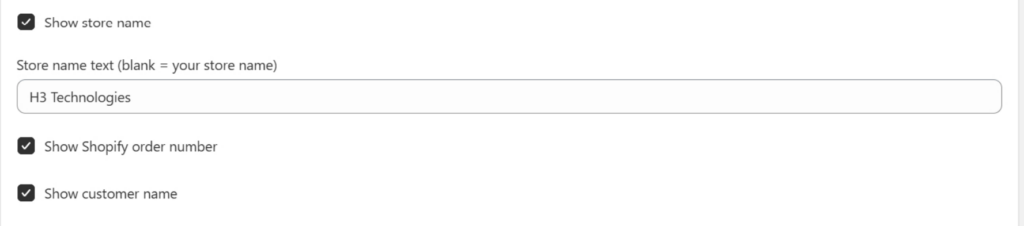
Watermark toggles let you stamp your store name, the Shopify order number, and the customer name onto every shared clip. The store name text here reads H3 Technologies, the brand behind the app.
Above the watermark, a Video retention control decides how long packing videos are kept before they are deleted automatically, up to a maximum you can see on the slider. This is where you match your proof to your real world timelines. A store that ships expensive items and offers a long return window may keep videos for the full period, while a store with fast moving low cost goods may keep them for a shorter time. There is also a simple Mute audio option for teams that prefer silent clips, and an optional order tagging control that adds a tag such as packing video to each order after its clip uploads, which makes the covered orders easy to filter later.
These settings look small, but together they are how you shape a proof of packing policy that fits your store rather than a generic one size template. You decide what the watermark says, how long clips live, and how orders are tagged. That flexibility is what lets a one person shop and a large warehouse both run the same app in a way that feels native to how each of them ships.
The activity log: every recording and proof link in one place
Recording proof is only half the job. Finding it again months later, on the exact day a dispute lands, is the other half, and that is what the Activity screen is built for. It is a live log of every recording and upload, newest first, so a manager can see at a glance that orders are being covered across the whole team. Each entry shows a status such as Uploaded or Uploading, the order number as a clickable link back into Shopify, a private proof link, and a precise timestamp.

Every recording lands in the activity log with its order number, a private proof link, and a timestamp. The proof links are blurred here for privacy while the order numbers and times stay visible.
The quiet power of this screen is that it turns a pile of separate clips into an organised record you can trust. When a missing item dispute arrives, speed is everything, and because every clip is already attached to its order, your reply takes seconds rather than an afternoon of searching. You find the order, open the record, and the packing video is waiting, already matched, already stamped, and ready to share. Tap any order in the log to open it, and the whole history of that parcel is one click away.
How the video links to the order automatically
The feature that saves the most time is the one you never actually see working. Parcel Proof Video links each clip to its Shopify order through an order metafield, so the proof lives with the order permanently rather than in a separate app you have to remember. You do not name files, sort folders, or hunt for the right clip weeks after the pack. You open the order, and the video is simply there, alongside the customer, the line items, and the shipping details.
This automatic link is what makes the whole system practical on a genuinely busy day. Manual proof systems fail not because filming is hard, but because matching a clip to the right order later is tedious, and tedious steps get skipped the moment things get hectic. By doing the linking itself, the app removes the one place where a proof workflow usually breaks. The result is that your evidence is complete even during your busiest week, which is exactly when disputes are most likely to appear.
What the customer sees when you share the proof
When you respond to a claim, you copy the private viewer link and send it in your own email or WhatsApp message. The customer opens it in any browser and watches the exact clip that shows their order being packed and sealed, complete with the watermark that names their order number and the date. There is nothing to download and no account to create. Most honest disputes end the moment the buyer sees their own order number and product going into the box, because the story they half believed no longer holds together in front of the footage.
This customer facing player does something subtle and powerful. It changes a tense standoff into a calm, shared fact. Instead of your word against theirs, both of you are now looking at the same order proof video. Genuine mistakes, such as a real packing slip that got missed, are settled quickly and kindly, because you can see the problem too and fix it with goodwill. False claims quietly disappear, because there is nothing left to argue about once the video is on the screen. Either way the conversation is shorter, fairer, and far less stressful for everyone.
Using a packing video as chargeback proof
A chargeback is when a buyer asks their bank to reverse a card payment, and for a store it is one of the most stressful disputes of all, because a stranger at the card network decides the outcome based only on the evidence each side submits. Strong evidence wins and weak evidence loses. A clear packing video is some of the strongest chargeback proof a small store can provide, because it speaks to the one question every other document leaves open.
When you respond to a chargeback you usually attach order details, tracking, and any proof of delivery. Those documents show that a parcel was addressed and moved, but they cannot show what was inside it. Adding a packing video that shows the product and the order number going into the sealed parcel closes that final gap. It proves the item existed, matched the order, and left your store. Paired with tracking that shows the parcel was delivered, your case becomes genuinely hard to argue against, and this is the moment a Shopify packing video app pays for itself many times over.
It helps to understand the language card networks use, because framing your reply in their terms improves your odds. When you fight a chargeback you are submitting what the networks call representment, and the case is judged on whether you provided compelling evidence that the customer received what they ordered. A watermarked packing video is close to the definition of compelling evidence, because it is specific, dated, and tied to the exact order under dispute rather than a generic policy statement. When you place that clip beside a delivery scan and the original order confirmation, you are handing the reviewer a complete story with no gap for reasonable doubt, which is the standard that actually decides these cases.
How to respond fast
Open the Activity log or the order, copy the packing video link, and attach it alongside your tracking and delivery proof in the dispute reply. Add a short, calm note that points the reviewer to the moment the order number and product appear in the clip. Clear, dated, watermarked proof does the rest of the work for you.
Plans and usage that scale with how you ship
Every store ships a different number of parcels, so Parcel Proof Video is built to scale with your volume rather than force one size on everyone. A free plan lets a smaller store record a monthly allowance of short clips at no cost, which is enough to protect the orders most likely to be disputed. As you grow, paid plans raise the number of videos, lengthen the maximum clip, and increase the resolution, and each paid plan comes with a short free trial so you can prove the value before you commit. The This month meter on the dashboard keeps your usage visible, so there are never any surprises.
Because proof pays off most on the orders that get disputed, usage visibility also helps you aim well. Many stores begin by recording high value orders and known problem products, then expand to every order once the routine feels natural and the first won dispute has paid for the whole year. The dashboard makes that easy to track, so your Shopify packing video app spend always maps directly to the protection you actually receive. You are never paying for coverage you do not use, and you can move up the moment your volume calls for it.
Which stores benefit most from packing video proof
Almost any Shopify store that ships a physical parcel gains something from an order proof videobut a few kinds of business feel the difference immediately. Stores that sell high value goods such as electronics, jewellery, cosmetics, or collectibles are natural targets for an empty box claimbecause the payoff for a false claim is large, and for them a single clip can save the price of a whole product in one afternoon. Stores that ship many small items in one parcel, where a missing item dispute is easy to allege and hard to disprove, benefit just as much, because the video shows every unit going into the box in plain sight.
Cash on delivery and high refund markets are another strong fit, since a merchant there carries most of the risk if a buyer changes their mind or invents a problem after delivery. So are subscription boxes, hampers, and bundles, where the exact contents are the whole promise of the product. Even a small home run shop that ships only a handful of parcels a day gets peace of mind from recording, because it is often the smaller store that can least afford to lose a product and a refund at the same time. The common thread is simple. If you have ever refunded an order you were sure you packed correctly, proof of packing was built for you.
It is also worth saying who benefits beyond the merchant. Honest customers benefit, because a genuine complaint is resolved in their favour faster when the footage shows a real mistake. Support staff benefit, because a stressful argument becomes a calm link to a video. Even the card networks and couriers benefit, because a dispute backed by clear, dated evidence is quicker for everyone to close. Packing video proof is not a weapon aimed at customers. It is a shared source of truth that makes the whole transaction fairer on every side.
Best practices for clear, honest packing videos
The difference between a clip that wins a dispute and one that leaves room for doubt comes down to a handful of small habits. None of them are hard, and none of them slow the line once they become second nature. They just need to be consistent across your whole team so that every packing video for Shopify orders tells the same clear story.
- Show the order number first. Bring the picking slip or the screen into view at the start so the clip is tied to the order beyond any question.
- Keep the product in frame the whole time. Do not let the item leave the shot between showing it and placing it in the box, so there is no gap a reviewer could doubt.
- Light the bench well. A bright, even packing area makes labels, colours, and quantities easy to read on camera.
- Seal on camera. Let the final frame be the closed, taped parcel so there is no space between packing and shipping.
- Do not edit. One continuous take is far stronger proof than a clip that looks trimmed or joined together.
- Keep it short. Twenty to forty seconds is plenty for most orders and keeps your packing line moving.
Make it a team habit, not a chore
Proof only protects you if it happens on every order you decide to cover, so the goal is to make recording as automatic as weighing and labelling already are. Pair each packer device once, keep the camera in a fixed and comfortable spot, and record the pack as naturally as you tape the box. After the first busy week most teams stop thinking about the step entirely, and the first dispute they win with a thirty second clip is usually the moment the habit sticks for good.
Packing video proof versus the old way
Many stores try to solve disputes with photos, handwritten notes, or plain memory. Those methods help a little, but they all leave the one gap that actually decides a case, which is showing the product going into the sealed box in real time. Here is how a proper packing video compares with the common alternatives, point by point.
| Situation | Photo or note only | Packing video proof |
|---|---|---|
| Empty box claim | Hard to disprove | Clip shows the item sealed inside |
| Missing item dispute | Your word against theirs | Every item visible on camera |
| Wrong item sent | A photo may not match the order | Order number and product both shown |
| Chargeback reply | Thin evidence | Strong, dated, watermarked proof |
| Finding the proof later | Search folders by hand | Attached to the order in Shopify |
No. A packing video takes about the same time as taping the box, roughly twenty to forty seconds per order. Because the clip links to the order on its own, there is no extra sorting or uploading work later, and most teams stop noticing the step within the first week.
Do I need to install anything to start?No. You can record or upload straight from your browser on the Record a video screen with no install at all. The optional Android app is only there for warehouses that want to record from packers phones at scale, and it pairs with a simple code.
What if the customer really did receive a faulty or missing item?+
Then the video helps them too. If the clip shows a genuine packing mistake, you can refund or replace quickly and with goodwill. Proof cuts both ways. It settles honest problems fast and stops false claims, which is exactly what a fair store wants.
Where are the packing videos stored and for how long?+
Can I use the video as chargeback proof with the card network?+
Is the video link private?+
On this page
The quiet tax of claims
What a packing video is
Inside the Shopify admin
Recording a packing video
Pairing devices and the app
Watermark and settings
The activity log
Auto linking to the order
What the customer sees
Chargeback proof
Plans and usage
Who benefits most
Best practices
Proof versus the old way
FAQ
Share this guide
h3TechnologiesWhere Business MeetsH3 Technologies is a leading agency providing web services, IT consultancy, and mobile app development. Parcel Proof Video is our packing video proof app for Shopify stores.
Our Services
Website Solutions
App Development
Ecommerce Development
Cloud Services
Digital Marketing
Useful Links
About Us
Blog
Contact Us
Privacy Policy
Pricing
Contact Info
021 38381016
info@h3techs.com
All rights reserved. Copyright © H3 Technologies
SEO setup for your web team
Page title tag
Inside Parcel Proof Video: A Complete Walkthrough of the Shopify Packing Video App | H3 Technologies
Meta description
A screen by screen walkthrough of Parcel Proof Video, the Shopify packing video app. See how a packing video for Shopify orders stops empty box claims and missing item disputes and gives you strong chargeback proof.
URL slug
parcel-proof-video-walkthrough
Focus keywords
packing video for Shopify orders, order proof video, empty box claim, missing item dispute, Shopify packing video app, proof of packing, chargeback proof, parcel proof video
H1 heading
Inside Parcel Proof Video: A Complete Walkthrough of the Shopify Packing Video App
Article schema
BlogPosting with author H3 Technologies, datePublished 2026-08-01, image of the Parcel Proof Video dashboard
Internal links
Link to the Parcel Proof Video landing page and the Shopify app listing on every focus keyword
Then the video helps them too. If the clip shows a genuine packing mistake, you can refund or replace quickly and with goodwill. Proof cuts both ways. It settles honest problems fast and stops false claims, which is exactly what a fair store wants.
Clips are stored by the app and linked to each Shopify order through an order metafield, so you find them by opening the order or the Activity log. You choose the retention period in Settings, so your proof matches your return and dispute windows, and older videos are deleted automatically.
Can I use the video as chargeback proof with the card network?Yes. A watermarked packing video that shows the order number and product going into the sealed box is strong evidence. Attach the private video link alongside your tracking and delivery proof when you respond to the chargeback.
Is the video link private?Yes. Each viewer link is private and hard to guess, and there is no login for the customer. You share it only with the person who needs to see it, and anyone with the link can watch the clip without downloading anything.