

SHORT ANSWER
The WhatsApp Business API is billed per delivered message. The price depends on the type of message (marketing, utility, authentication or service) and the country of the person receiving it. Customers messaging you is always free, and each business number gets 1,000 free service replies a month. On top of Meta's charges, you pay a monthly fee for the platform you use, such as Texnity.
"How much does WhatsApp API cost?" is one of the first questions every business asks us. The honest answer is that it depends on what you send and who you send it to. The good news: once you understand four message types, the bill is easy to predict.
Meta changed the rules again on 1 October 2026, so a lot of older guides online are now wrong. This one is up to date as of November 2026.
In this guide
- How WhatsApp API pricing works
- The four message types
- What is free
- What changed in October 2026
- Example rates: US and UK
- A real monthly bill, worked out
- Meta's charges vs your platform fee
- 7 ways to pay less
- Questions we get asked
How WhatsApp API pricing works
Since July 2025, Meta charges per message, not per conversation. Three things decide the price of each message:
- The message type. A promotion costs more than an order update.
- The receiver's country. A message to a UK number costs the UK rate, wherever your business is based.
- Delivery. You only pay when the message reaches the customer's phone. Failed messages are not charged.
Messages your customers send to you are never charged. You only pay for what your business sends.
The four message types
Every message your business sends falls into one of these groups. Templates (pre-approved messages) are put into a group when Meta approves them.
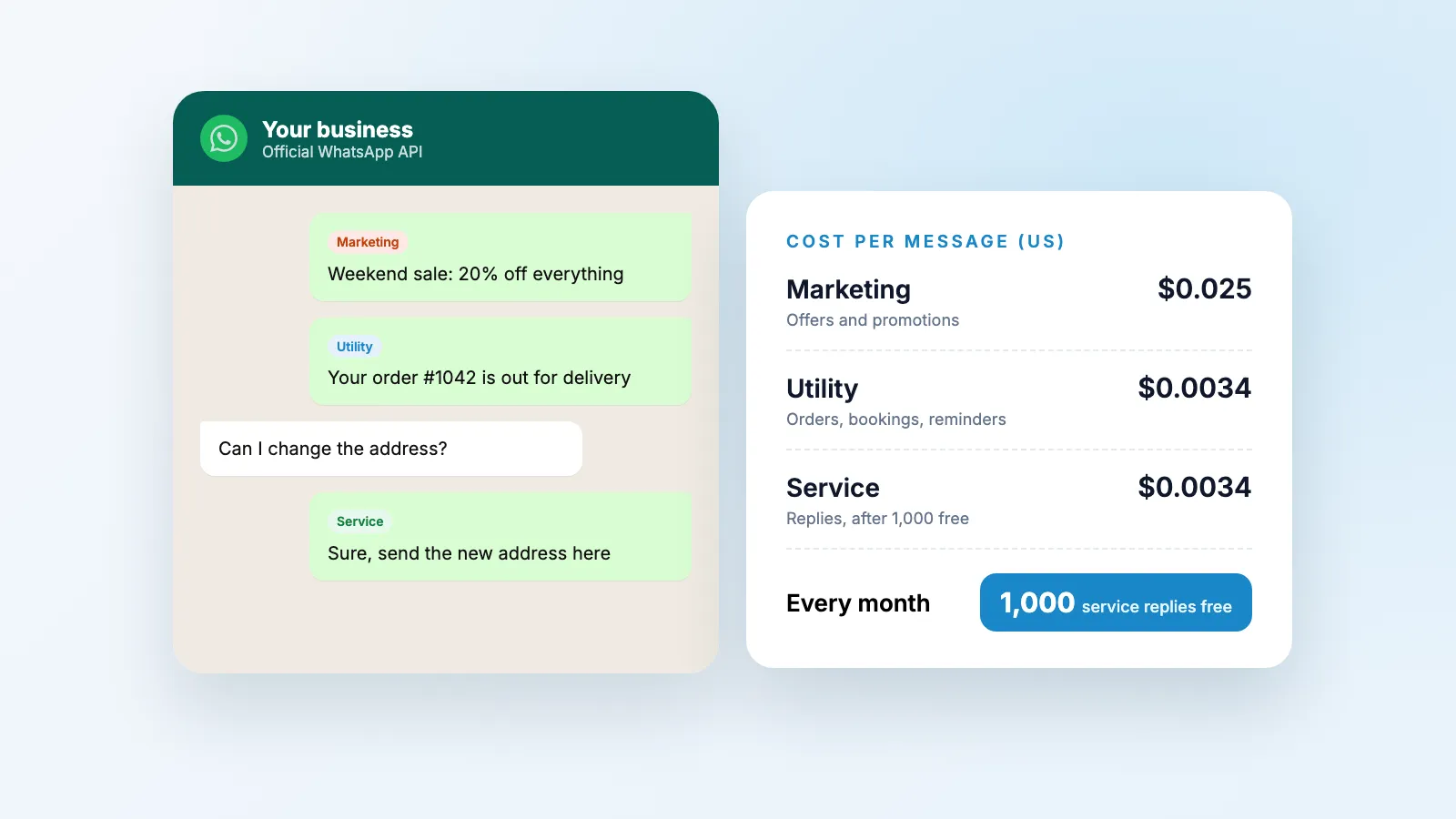
- Marketing: offers, sales, new products, "we miss you" messages and cart reminders. The most expensive type.
- Utility: updates about something the customer already did or asked for, like order confirmations, delivery updates, booking reminders and invoices. Much cheaper.
- Authentication: one-time login and verification codes. Priced like utility in most countries.
- Service: normal replies you type (or your AI agent sends) after a customer messages you, inside the 24-hour window.
One tip from experience: write utility templates as plain updates. If a delivery update also pushes a discount, Meta can class it as marketing, and you pay the higher rate.
What is free
- Messages from customers to you. Always free, no limit.
- 1,000 service replies a month, per business number. They reset every month and do not roll over.
- Chats that start from a click-to-WhatsApp ad or your Facebook Page button. Meta opens a free window, and messages you send while it is open are not charged.
What changed in October 2026
This is the change most businesses missed. Before 1 October 2026, every reply inside the 24-hour customer service window was free, and so were utility messages sent inside that window.
Since 1 October 2026:
- Service replies are charged after the first 1,000 a month per number, at the same rate as utility messages in that country.
- Utility messages inside the 24-hour window are charged too. They used to be free.
For a small business answering a few hundred chats a month, nothing changes, because you stay inside the 1,000 free replies. For busy support teams, replies are now a real line on the bill, which makes fast, complete answers (fewer back-and-forth messages) worth more than ever.
Example rates: US and UK
Meta publishes its rates as a downloadable rate card. These are the list rates from the card effective 1 October 2026, as reproduced by WhatsApp providers and checked on 21 November 2026. Rates change a few times a year, so check Meta's card before you budget.
| Country | Marketing | Utility and authentication | Service (after 1,000 free) |
|---|---|---|---|
| United States | about $0.025 | about $0.0034 | about $0.0034 |
| United Kingdom | about $0.064 | about $0.022 | about $0.022 |
Two patterns hold in almost every country: marketing costs several times more than utility, and utility gets cheaper as you send more (Meta has volume tiers for utility and authentication). Pakistan's utility and authentication rates went up twice in 2026, in April and again in October, so check the latest card if most of your customers are there.
A real monthly bill, worked out
Say you run an online store and in one month you send:
- 2,000 order and delivery updates (utility)
- 500 promotional messages to customers who opted in (marketing)
- 800 replies to customer questions (service, inside the free 1,000)
| Customers in the US | Customers in the UK | |
|---|---|---|
| 2,000 utility | about $6.80 | about $44.00 |
| 500 marketing | about $12.50 | about $31.75 |
| 800 service replies | $0 (free) | $0 (free) |
| Meta total | about $19.30 | about $75.75 |
Notice what drives the bill: the marketing messages. Cutting promotions you do not need saves far more than cutting order updates.
Meta's charges vs your platform fee
Meta does not give you an inbox or tools. You use the API through a platform, and the platform charges its own fee on top of Meta's messages. When you compare platforms, ask two questions:
- Do you add a fee to every message? Some providers add a small charge per message, inbound and outbound. At volume, that can cost more than Meta's own rate.
- What does the monthly fee include? Shared inbox, number of team members, AI replies, broadcast campaigns and flows can all be extras.
Texnity, our own platform, has four monthly plans: Lite $20, Basic $49, Grow $99 and Advance $150. Every paid plan includes every feature: the shared inbox for WhatsApp, Instagram, email and website chat, the AI agent, campaigns, flows and tickets. The plans differ by how much you use, not by which features you get.
7 ways to pay less
- Answer inside the window. When a customer messages you, reply properly and fully. Service replies are your cheapest messages, and the first 1,000 are free.
- Keep updates as updates. Order and booking messages qualify as utility only if they stay about the order. Leave the discount out.
- Send fewer, better promotions. Target customers who bought recently or showed interest, not your whole list.
- Use click-to-WhatsApp ads. Chats that start from those ads open a free window for your follow-up messages.
- Let an AI agent answer in one go. One complete answer beats four short replies, especially now that service messages count.
- Clean your contact list. Customers who block or report you lower your quality rating with Meta, which can limit how many messages you can send.
- Grow into the volume tiers. Utility and authentication rates drop as monthly volume grows, counted across your whole business account.
Questions we get asked
Is the WhatsApp Business API free?
Not fully. Meta gives each business phone number 1,000 free service messages a month (replies to customers who messaged you). Everything else, like marketing, utility and login code messages, is charged per delivered message. Messages your customers send you are always free.
What changed on 1 October 2026?
Before October 2026, replies inside the 24-hour customer service window were free. Since 1 October 2026, Meta charges for service replies after the first 1,000 a month per number, and utility messages sent inside the window are charged too.
Am I charged if a message is not delivered?
No. Meta only charges for messages that are delivered to the customer's phone.
Which country's price do I pay?
The price depends on the country of the person receiving the message, not where your business is. A message to a UK number costs the UK rate, even if your business is in Pakistan or the US.
Do I pay Meta and the platform separately?
Yes. Meta sets the per-message charges. A platform like Texnity charges its own monthly fee for the inbox, AI agent, campaigns and team tools on top.
Can I keep my current WhatsApp number?
Usually yes. A number on the WhatsApp app can be moved to the Business API. Save any chat history you need first, because it does not move with the number.
Want to see what your bill would be?
Tell us roughly how many orders, bookings or customer chats you handle each month and where your customers are. We will show you what WhatsApp would cost and how Texnity would handle it. See Texnity or talk to our team.